Import and inspect
Bring product photos into one batch and inspect dimensions, format and warnings. A warning remains visible when the source needs attention.
Owned-product case study
A local product-photo workflow for iPhone, iPad and Mac. Built by VaultDevLabs, from image import through review and export.
Product photos arrive with different sizes, formats and names. A seller needs to inspect the source, prepare consistent outputs and understand what still needs human review.
We built Seller Photo Prep to make those steps one local workflow. The source images remain unchanged, and the user reviews the result before exporting.
This is our own product build. It is not a rescued client project, customer testimonial or claim about sales growth.
Bring product photos into one batch and inspect dimensions, format and warnings. A warning remains visible when the source needs attention.
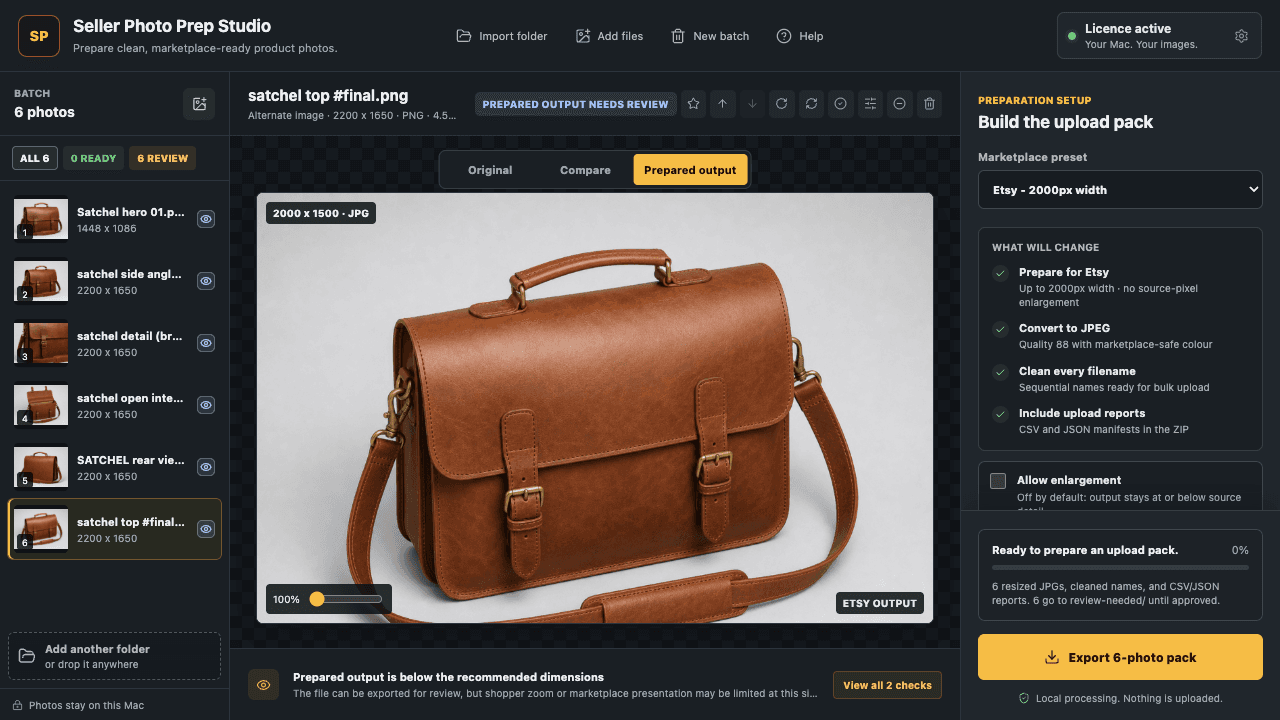
Use marketplace or output settings to resize, convert and name photos. Compare the original with the prepared output before committing to an export.
Produce a named output set with a summary, leaving the originals intact. The Mac screen below shows the preparation settings, output preview and remaining review work together.
For a repair or completion project, these are the kinds of workflow boundaries we agree and test: inputs, output, failure states and what must be preserved.
The screenshots are from our Mac app. The public Apple listing is the source for current availability, supported devices and purchase information. This page does not claim customer revenue, a conversion uplift or results for another project.
View the current App Store listingHave an app that needs finishing? Read how we assess ownership, build health and repair-versus-rebuild decisions before scoping the work.
Explore app rescue & repair