VaultDevLabs

iPhone, iPad & Mac app rescue

Unfinished app?
A clear way forward.

Broken build, failing workflow or an abandoned handover. Find out what can be repaired and what it takes to finish.

Start with a short description. No source code, passwords or payment needed to enquire.

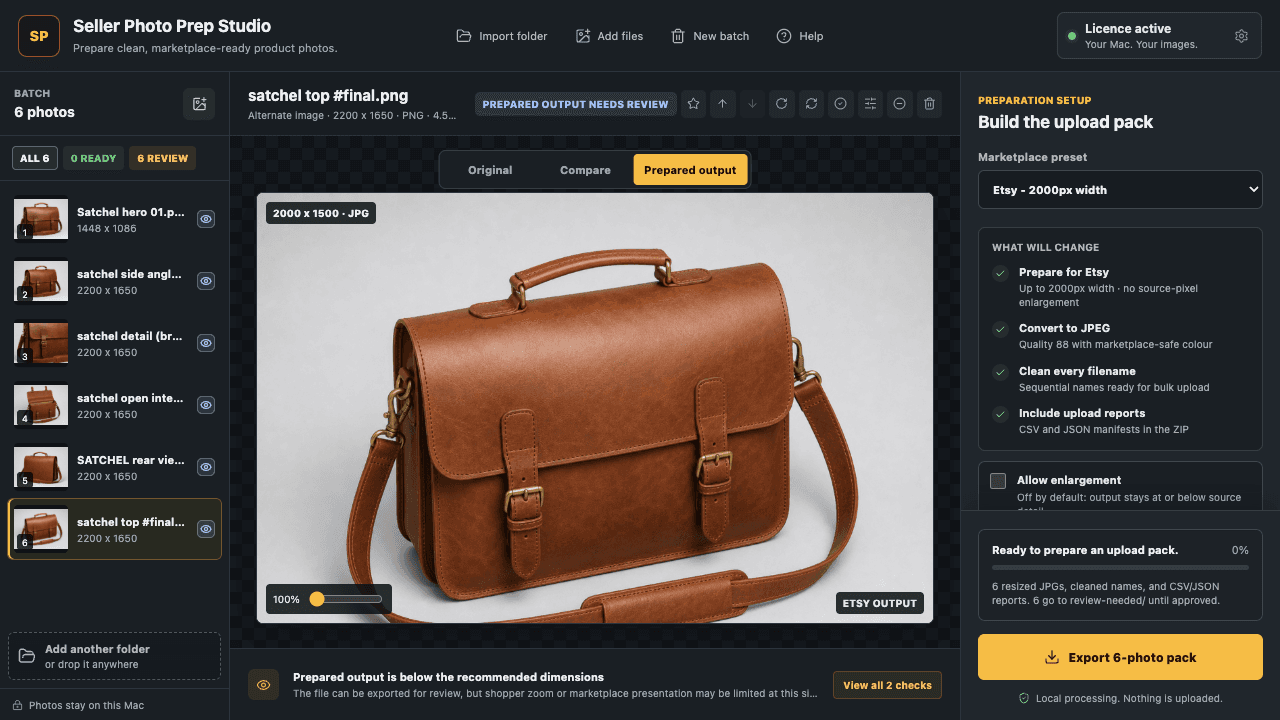
Seller Photo Prep, our own Mac app, reviewing product photos before export.
Built by VaultDevLabsOur own product, not a client rescue
Inside the Seller Photo Prep build

Start with the blocker.

An app rescue starts with evidence: a repeatable problem, a build we can inspect and a useful outcome to work towards.

The app will not build or ship

Build errors, dependencies, signing, entitlements or release configuration can stop an otherwise useful app. We first check whether the build can be reproduced and identify the evidenced blockers before proposing changes.

A core workflow keeps breaking

Imports, exports, purchases, restores and saved work need end-to-end checks. We agree the failing scenario and what a passing result must look like, including error and recovery states.

The project was left unfinished

When a developer leaves or an AI-generated prototype stalls, the first job is to establish what you own, what works and what is missing. Completion, targeted repair and rebuilding are different scopes.
Repair, finish
or rebuild?

A rebuild is not the default answer. We compare the current code with the workflow you actually need and explain the trade-offs.

  • Repair: a working foundation with a specific fault. Isolate it and define a regression check.
  • Finish: useful existing code with missing workflows, testing or release preparation. Separate essentials from later features.
  • Rebuild or migrate: source, licensing or platform constraints prevent a maintainable fix. Explain what can be retained and how existing data is protected.

An assessment may conclude that a project is not a suitable fit. You get the proposed scope and limitations before deciding on paid implementation.

Before you hand over an unfinished app.

A practical checklist, even if you are still deciding who should help.

  1. Confirm ownership. Identify who controls the repository, app listing, domains and third-party licences. Do not send credentials in an enquiry.
  2. Record the failure. Note the device, operating system, steps and expected result. Remove personal information from any error text.
  3. Identify the last working version. Keep the existing source, release and data backed up. Do not erase them while arranging help.
  4. Define one useful outcome. For example: import photos, export a pack and reopen the saved job without losing work.
  5. Agree how completion is checked. Ask for the test evidence, release approval step, source handover and any ongoing costs in the scope.

Evidence from our own product

See a workflow we built.

Seller Photo Prep turns a set of product images into a reviewed export pack. Our case study explains the import, review and export decisions behind it, with a real app screen and public listing.

Read the Seller Photo Prep case study

What is stopping
your app?

Tell us what happens, what should happen and what you need to finish. Project details can wait if you do not know them yet.

  1. We review your brief

    We reply by email with questions or a proposed next step.

  2. You approve the scope

    Any diagnostic fee, deliverables and access are agreed before paid work.

  3. Verify before release

    Agree the checks, recovery plan and handover for the work being done.

Prefer email?
support@vaultdevlabs.com

30–5,000 characters. 0 / 5,000 used.

Public HTTPS link only. No private login links or secret tokens.

Add project details (optional)

Please don’t include passwords, API keys, customer data or confidential files. We’ll agree any access separately. Read our privacy notice for how enquiry information is handled.

An enquiry does not reserve availability or commit you to paid work. You can also email support@vaultdevlabs.com.

App rescue questions.

Can you take over another developer’s app?

We can assess it if you have the right to use and share the source and relevant accounts. We establish the build, dependencies and ownership first. Missing source, licences or account control may limit what is possible.

Can you fix an AI-built or no-code app?

We can assess the project. Source export, platform restrictions and third-party dependencies determine what can be changed. We do not assume a generated prototype is production-ready or that every no-code project can be migrated.

How much does app rescue cost?

The initial enquiry is free. Repair work is quoted against an agreed scope. If a paid diagnostic is needed before a reliable estimate is possible, its price and deliverables are agreed first. There is no automatic charge or commitment when you enquire.

Will you guarantee App Store approval or a recovery deadline?

No. We can scope technical fixes, verification and release preparation. Apple makes review decisions, and the condition of an inherited project affects the work needed. A schedule is agreed after assessment, not promised from a short form.

Will you change the live app during the assessment?

Not without separate approval. We agree access, backups or recovery, test data and a release plan before implementation. Sending an enquiry does not authorise access to or scanning of your systems.

A useful next step.
An agreed scope.

Discuss an app rescue